The following snippet will outline how to add indentation for tabs and spaces to the detail view for textarea fields in SugarCRM.
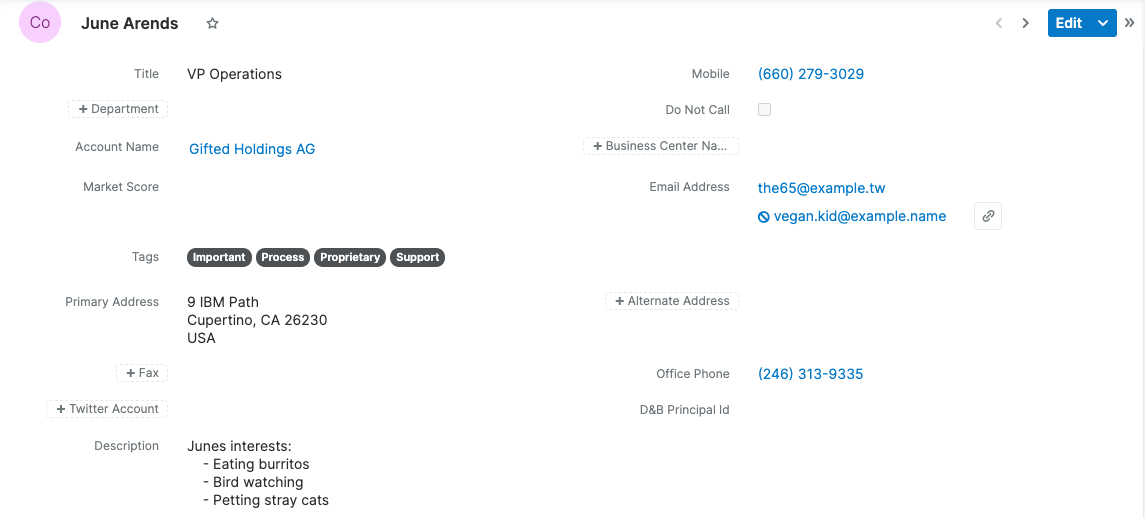
The basics
To accomplish our desired formatting, we will first need to create a custom helper function for the handlebar templates.
./custom/JavaScript/CustomHandlebarHelpers.js
/**
* Custom Handlebar helpers.
*
* These functions are used in handlebars templates.
* @class Handlebars.helpers
* @singleton
*/
(function(app) {
app.events.on("app:init", function() {
/**
* convert text to HTML for formatting
*/
Handlebars.registerHelper("customTextToHTML", function (text)
{
text = Handlebars.Utils.escapeExpression(text);
text = text.replace(/([^>\r\n]?)(\r\n|\n\r|\r|\n)/g, '$1' + '<br>');
text = text.replace(/(\t)/g, ' ');
text = text.replace(/(\x20)/g, ' ');
return new Handlebars.SafeString(text);
});
});
})(SUGAR.App);Next, we need to create a JSGrouping to register our new function.
./custom/Extension/application/Ext/JSGroupings/CustomHandlebarHelpers.php
<?php

foreach ($js_groupings as $key => $groupings) {
    $target = current(array_values($groupings));
    if ($target == 'include/javascript/sugar_grp7.min.js') {
        $js_groupings[$key]['custom/JavaScript/CustomHandlebarHelpers.js'] = 'include/javascript/sugar_grp7.min.js';
        break;
    }
}
Next, we need to copy ./clients/base/fields/textarea/detail.hbs to custom/clients/base/fields/textarea/detail.hbs and replace all instances of {{nl2br}} with {{customTextToHTML}}
./custom/clients/base/fields/textarea/detail.hbs
<div>
{{#if value.short}}
{{#if collapsed}}
{{customTextToHTML value.short}}…
{{else}}
{{customTextToHTML value.long}}
{{/if}}
<button data-action="toggle" class="btn btn-link btn-invisible toggle-text">
{{#if collapsed}}
{{str 'LBL_TEXTAREA_MORE' module}}
{{else}}
{{str 'LBL_TEXTAREA_LESS' module}}
{{/if}}
</button>
{{else}}
{{customTextToHTML value.long}}
{{/if}}
</div>
Finally, navigate to Admin > Repairs > Quick Repair and Rebuild and your changes will be there after a refresh.